
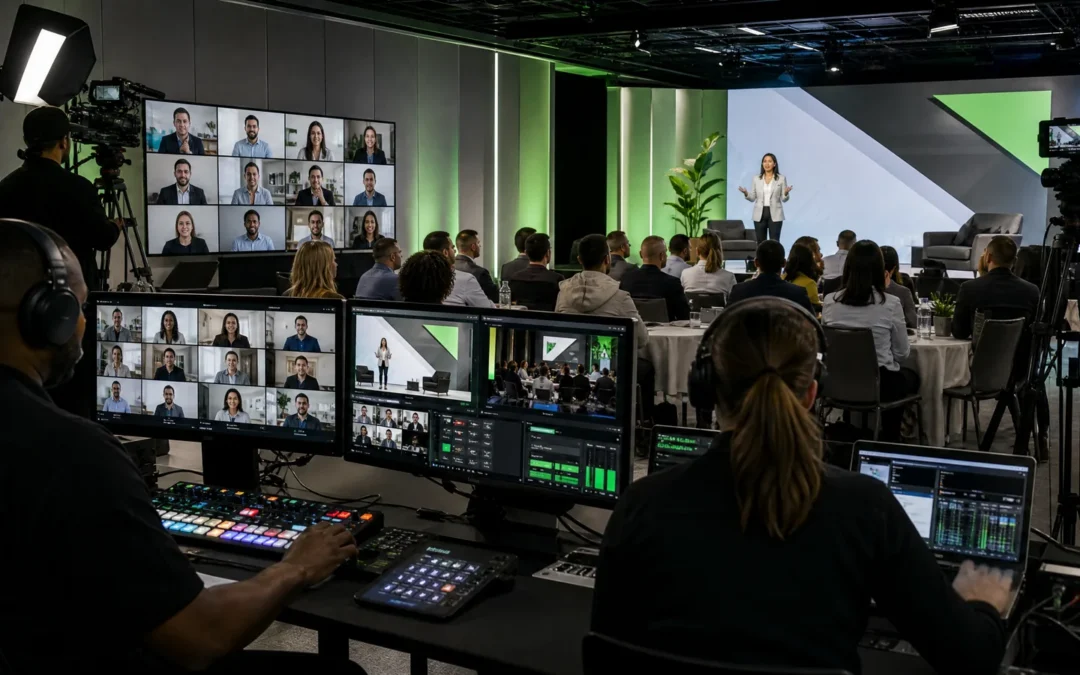
A hybrid sales kickoff planning problem is less about the venue and more about equal attention: executives want crisp messaging, sales leaders want momentum, and remote sellers want to feel included rather than sidelined. If you treat the remote audience as an afterthought—projecting a camera from the back of the room and calling it a stream—you get applause in the ballroom and confusion across time zones.
Hybrid sales kickoff planning matters because it ties the live event, the remote attendee experience, and the post-event enablement package into one operational plan that teams can run, trust, and reuse.
Ready to Elevate Your Corporate Video Production?
ICV Digital Media delivers professional video production, live streaming, and event coverage for Fortune 500 companies and regional teams nationwide. Book a free 30-minute strategy call.
What event teams should prioritize in hybrid sales kickoff planning
In practice, planners are trying to reduce friction before the event, protect the live and virtual experience during the event, and create usable follow-through afterward. Those three goals map to a handful of concrete deliverables: a finalized run of show, speaker prep and rehearsal schedules, clear audio and camera blocking plans, backup paths for streaming, and a recording handoff that supports captioning and edit packages.
Frequently asked questions about hybrid sales kickoff
Why does hybrid sales kickoff matter for corporate event teams?
Because the hybrid format exposes every production gap. A missing mic, a poor camera angle, or unreadable slides are not just annoyances — they undermine the message. Event teams need to protect executive approval moments, preserve sponsor deliverables, and produce recordings that become enablement clips.
How should planners improve hybrid sales kickoff before the event?
Start from outcomes: what should a remote seller be able to see, hear, ask, and access after the session? From there, lock the run of show, schedule at least one full technical rehearsal with camera blocking and slide timing, confirm audio paths and redundancy, set speaker prep sessions with teleprompter or cue plans if needed, and define the recording handoff and captioning timeline.
Hybrid SKO planning is now a cross-functional activity—sales enablement, internal comms, IT/security, and event production must agree on scope, access controls, and replay distribution. Distributed revenue teams need the in-room energy without excluding managers, partners, or international regions.
Highspot notes that hybrid work requires intentional engagement as part of modern SKO design.1 Salesforce also emphasizes audience-centric planning, collaboration, camaraderie, and interactive moments rather than passive presentation blocks.2
The remote audience notices everything
In the ballroom, people pick up nonverbal cues: side conversations, applause, or a charismatic pause. Remote attendees only get what production gives them: framing, audio, slide legibility, stream stability, moderated chat, captions, and reliable access to recordings. If any of those fail, remote participants feel secondary.
Design the event from the remote experience backward. Before finalizing room layout or speaker transitions, ask: what will a remote seller actually see and hear at this moment? Will they be able to ask a question and have it answered on stage? Will the slides be readable on a laptop in a noisy airport? Will the recording include captions and a clean speaker track for post-production?
Use production design to create equal access
Equal inclusion doesn’t mean identical experiences; it means each audience gets what they need to understand, participate, and apply the message. In practice that looks like:
- Executive keynotes — In-room: stage presence, room energy, lavs and audience mics. Remote: close camera framing, clean audio feed, readable slides, and a chaptered recording for replay.
- Q&A — In-room: floor microphones and moderator flow. Remote: moderated chat, a clear path for remote questions to reach the stage, and visible answers captured in the recording.
- Breakouts — In-room: facilitated group work. Remote: virtual breakout rooms, regional leads or digital worksheets so online attendees have parallel participation.
- Product demos — In-room: large screen visibility. Remote: direct screen share feeds, camera cuts to product detail, and replay-friendly edit points.
- Networking — In-room: hallway and meal interactions. Remote: structured virtual touchpoints, post-session forums, and manager-led regional huddles.
- Replay — In-room: optional review. Remote: essential access across time zones, with recordings edited and captioned for on-demand consumption.
ICVDM’s Live Webcasting & Production services coordinate cameras, audio, lighting, graphics, streaming, speaker transitions, and contingency plans so the event feels like one program rather than two disconnected broadcasts.
Design interaction before the show starts
Hybrid participation must be engineered. A chat box alone does not create engagement. Define when remote attendees can ask questions, how those questions will surface to the moderator on stage, who will manage chat moderation, and how remote comments will be represented live. For workshops, create parallel activities—virtual breakout rooms, shared documents, live polls, or manager-run follow-ups—so online attendees are active participants rather than spectators.
Allego recommends strategic tech to support live polls, Q&A, digital breakouts, and centralized materials.3 For ICVDM clients, the Event Platform & Portal is the place to consolidate registration, breakout access, session navigation, and post-event content in a branded, searchable hub.
Protect the executive message across every channel
Key leadership moments—CEO vision, CRO priorities, product launches—must land the same way in room, stream, and replay. That means rehearsal with camera blocking, speaker prep for camera address, and a production plan that calls for close-ups, lower thirds, and screen shares at the right times. It also means executive approval on the run of show and any pre-recorded segments before they go live.
Rehearsals should include a full tech run with the run of show, test of backup streaming paths, captions or subtitles enabled, and a recording handoff defined so editors can create short enablement clips quickly after the event.
Make replay part of the hybrid promise
Replay is not an afterthought; it’s part of the attendee commitment. Time zones, travel, and customer calls will prevent many people from watching live. A secure replay library with captions, chaptering, and downloadable resources turns one live moment into multiple enablement assets. Long-form recordings should be edited into short, titled clips that travel through enablement channels.
ICVDM’s Video Production & Editing services specialize in turning hour-long sessions into clear, short clips with captions and metadata so managers can assign specific segments for follow-up.
When should you use a studio for key moments?
Not every keynote needs to be live on stage. Controlled studio environments reduce risk for complex product demos and global executive addresses. Studios allow camera blocking, green-screen support, and reliable audio that are often difficult to reproduce in a ballroom. Use studio-captured segments for content that will be heavily reused or when you need a polished, consistent recording across regions.
ICVDM’s Studio Equipment & Rentals can support pre-recorded segments, hybrid live switches, and higher-quality captures for content that becomes central to post-event enablement.
ICVDM production note
Field-tested advice: run at least one full dress rehearsal with the full run of show, including remote connections and moderator workflows. Try a mock Q&A that pulls questions from the chat and from in-room mics so your moderator practices triage. Confirm audio paths (house mix vs. stream mix), test captions or live transcription, define backup streaming paths, and agree on recording handoff times so editors can start building clips immediately after the event. Also, coordinate speaker prep with executive approval windows and confirm sponsor deliverables—logo lower-thirds, pre-roll, or sponsor messages—well ahead of show day.
Practical Q&A — quick answers event teams ask
How do you handle time zones and global attendance?
Plan the core live window for the largest contiguous audience, then use regional recap sessions or staggered regional live streams. Always provide a secure replay with captions, chapter markers, and downloadable slides so teams in other time zones can access the material on-demand.
What should production rehearsals cover?
Rehearsals should cover camera blocking, audio checks (lavs and room mics), slide timing and overlays, stream encoding and redundancy, chat moderation flow, and a run-through of transitions between live and pre-recorded pieces.
How do you ensure sponsor deliverables and executive approvals are met?
Document deliverables in the run of show, schedule approval checkpoints, and include sponsor content in rehearsals. Capture a sponsor asset checklist and require sign-off on graphics and pre-roll assets before they are cleared for broadcast.
Next steps
If your sales kickoff needs to serve in-room and remote teams equally, ICVDM can help you assess the agenda, venue, streaming plan, speaker flow, virtual portal, and replay strategy before production decisions are locked. Contact ICVDM to schedule a hybrid SKO production consult and to discuss rehearsal, run of show, captions, backup paths, and recording handoff plans.
calendly.com/icvryanrollins/30min”>ICVDM’s Calendly link or contact the team to review your hybrid readiness.
How ICVDM helps
ICVDM helps organizations plan and produce hybrid sales kickoff planning projects with the strategy, technical production, livestream support, editing, and follow-up content needed to make the message clear and useful after the live moment ends.
References
Related ICVDM production resources
If this topic is part of an upcoming executive event, sales kickoff, town hall, or webcast, these ICVDM resources can help you plan the next step:
Ready to turn this into a stronger executive video program?
Book a 30-minute strategy call
If you are planning town halls, sales kickoffs, leadership updates, livestreams, or a year-round video content engine, Imageinators can help map the production path, reduce execution risk, and identify the highest-leverage content opportunities.
Plan a Better Corporate Event, SKO, or Livestream
If your team is planning a sales kickoff, leadership meeting, town hall, webcast, or hybrid event, use the form below to start a conversation with ICVDM.